
Tutor LMS Pricing Explained 2024: How To Save More Money?
Are you looking for the Tutors LMS Pricing Plan?
You are at the right place!
Tutor LMS is a comprehensive learning management system that allows individuals and organizations to create and sell online courses.
With its core plugin and advanced features, Tutor LMS provides a full-fledged online course marketplace for seamless learning experiences.
The Tutor LMS offers four pricing plans- free, individual, business & agency that starts from $0 per year to $799 per year.
In this article, we will dive deeper and discuss the different pricing structures of Tutors LMS. So what are you waiting for? Let’s get started-
Tutor LMS Pricing Plan Overview

| Name | Tutor LMS |
|---|---|
| Best For | Course Creators and Educators |
| Product Type | Learning Management System |
| Pricing | Starts at $199 Per Year |
| lifetime deal | Available |
| Money-back guarantee | 30-day refund policy available |
Tutor LMS offers affordable pricing plans to suit the needs of various users. One of their notable plans is the annual plan, which is priced at $199 to $799. This plan enables users to access all the advanced features and benefits of the platform for a full year.
Another amazing thing I love about Tutor LMS is their lifetime deal. They come with a one-time offer that will cost you $499 to $1899 for your entire life. I recommend this plan most as It will save your recurring expenses.
When comparing Tutor LMS to other platforms in the market, such as Rainmaker Platform and WooCommerce Membership, value for money becomes a crucial factor.
Tutor LMS stands out in this regard, offering an array of advanced features and functionalities at a reasonable price point.
Whether you are an individual tutor or running a full-fledged online course marketplace for individual courses, Tutor LMS provides a cost-effective solution that doesn’t compromise on quality.
With Tutor LMS, users can take advantage of features like the industry-first front-end course builder, advanced quiz creation features, and certificate builder.
The platform also offers a centralized monetization settings feature, enabling easy revenue generation. Tutor LMS provides excellent customer support, installation services, and content security.
Tutor LMS Pricing Explained
There LMS offers two types of pricing plans. Yearly subscription and Lifetime Deals. I will try to explain them both in this guide.
Tutor LMS Annual Plan
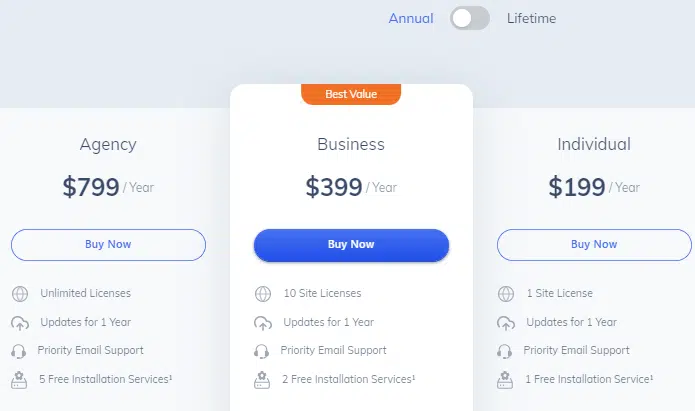
1. The Free Plan: You will get a free plan with Tutors LMS with the features like free version updates and community support. This plan comes with very limited features compared to the paid version.
2. Individual Plan: The Tutor LMS Individual plan comes with $199 per month. You will get 1 site license, 1 year of premium update features, priority email support and 1 free installation support. This plan is perfect for the course creator who is launching one website.
3. Business: The Tutors LMS business plan is the perfect suite for course creators who wanna launch multiple websites. This pro plan features offer 10 site licenses, priority email support and 2 free installation support for one year. You will be charged $399 per month for this business plan.
4. Agency: If you are an agency owner, the Tutor LMS Agency plan is what you are looking for. You will get unlimited site licenses, priority email support and 5 free installation support for one year. You will be charged $799 per month for this plan.
Tutor LMS Lifetime Deal
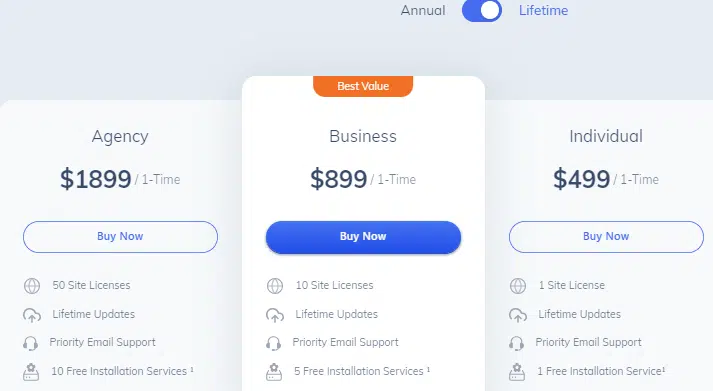
1. Individual Plan: The Tutor LMS Individual lifetime plan comes with $499 per month. You will get 1 site license, 1 year of premium update features, priority email support and 1 free installation support. This plan is perfect for the course creator who is launching one website.
2. Business: The Tutors LMS business lifetime plan is the perfect suite for course creators who wanna launch multiple websites. It offers 10 site licenses, priority email support and 2 free installation support for one year. You will be charged $899 per month for this business plan.
3. Agency: If you are an agency owner, the Tutor LMS Agency lifetime plan is what you are looking for. You will get unlimited site licenses, priority email support and 5 free installation support for one year. You will be charged $1899 per month for this plan.
All the lifetime plan comes with lifetime updates. So there is nothing to lose and it’s highly recommended to grab the Tutors life lifetime license.
Read Also: Tutor LMS Black Friday Deal: Get 50% Flat Discount
How To Save More Money On The Tutor LMS Plan?
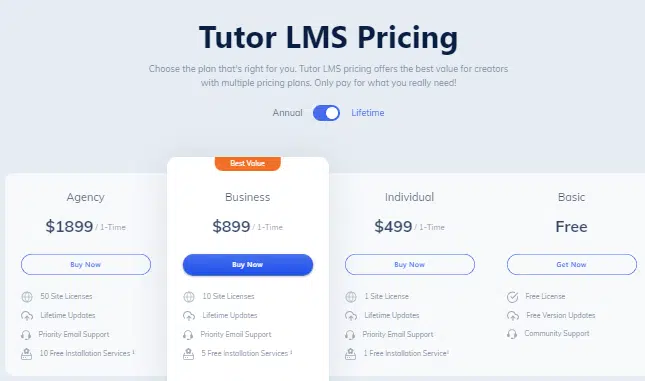
Grab the Tutors LMS Lifetime deal to save the recurring expenses of your company or businesses.
All you need to switch from an annual plan subscription to a lifetime deal subscription grab the one-time payment subscription.
Tutors LMS Pricing & Features Comparision
Here is the Tutors LMS Pricing & Features Comparison among the premium and free plans.
| Features/Pricing | Agency | Business | Individual | Basic |
|---|---|---|---|---|
| Annual Plan | $799 | $399 | $199 | $0 |
| Lifetime Plan | $1899 | $899 | $499 | $0 |
| Create Courses Smartly | ✔️ | ✔️ | ✔️ | ✔️ |
| Unlimited Courses | ✔️ | ✔️ | ✔️ | ✔️ |
| Course Content Protection | ✔️ | ✔️ | ✔️ | ✔️ |
| Course Rating & Review | ✔️ | ✔️ | ✔️ | ✔️ |
| Native Video Support | ✔️ | ✔️ | ✔️ | ✔️ |
| YouTube & Vimeo Support | ✔️ | ✔️ | ✔️ | ✔️ |
| Course Filtering Options | ✔️ | ✔️ | ✔️ | ✔️ |
| Public Course | ✔️ | ✔️ | ✔️ | ✔️ |
| Frontend Course Builder | ✔️ | ✔️ | ✔️ | ✔️ |
| Drip Course Content | ✔️ | ✔️ | ✔️ | |
| Course Preview | ✔️ | ✔️ | ✔️ | |
| Course Attachment Option | ✔️ | ✔️ | ✔️ | |
| Manage Students & Instructors | ✔️ | ✔️ | ✔️ | ✔️ |
| Unlimited Students & Instructors | ✔️ | ✔️ | ✔️ | ✔️ |
| Student & Instructor Dashboards | ✔️ | ✔️ | ✔️ | ✔️ |
| Student & Teacher Q&A | ✔️ | ✔️ | ✔️ | |
| Multi-instructor Ready | ✔️ | ✔️ | ✔️ | |
| Automated Student Grading | ✔️ | ✔️ | ✔️ | |
| Award Custom Certificates | ✔️ | ✔️ | ✔️ | |
| Drag & Drop Certificate Builder | ✔️ | ✔️ | ✔️ | |
| Custom Branded Certificates | ✔️ | ✔️ | ✔️ | |
| Unlimited Certificates | ✔️ | ✔️ | ✔️ | |
| Test Students With Quizzes | ✔️ | ✔️ | ✔️ | |
| Quiz Lite | ✔️ | ✔️ | ✔️ | |
| Advanced Quiz Creator | ✔️ | ✔️ | ✔️ | |
| Detailed Quiz Report | ✔️ | ✔️ | ✔️ | |
| Quiz Export/Import | ✔️ | ✔️ | ✔️ | |
| Advanced Analytics | ✔️ | ✔️ | ✔️ | |
| Reports & Analytics | ✔️ | ✔️ | ✔️ | |
| Earning Analytics | ✔️ | ✔️ | ✔️ | |
| Detailed Course Report | ✔️ | ✔️ | ✔️ | |
| Analytics Export Option | ✔️ | ✔️ | ✔️ | |
| Communications | ✔️ | ✔️ | ✔️ | |
| Push Notifications for students | ✔️ | ✔️ | ✔️ | |
| Announcement Option | ✔️ | ✔️ | ✔️ | |
| Site-wide Notifications | ✔️ | ✔️ | ✔️ | |
| Customizable Event-Triggered Emails | ✔️ | ✔️ | ✔️ | |
| Pre-built Email Templates | ✔️ | ✔️ | ✔️ | |
| Frontend Event Calendar | ✔️ | ✔️ | ✔️ | |
| Monetization | ✔️ | ✔️ | ✔️ | |
| Earning & Commission Allocation | ✔️ | ✔️ | ✔️ | |
| Single Course Selling Option | ✔️ | ✔️ | ✔️ | |
| Site-wide Membership | ✔️ | ✔️ | ✔️ | |
| Course Subscription | ✔️ | ✔️ | ✔️ | |
| Manual Enrollments | ✔️ | ✔️ | ✔️ | |
| Addons | ✔️ | ✔️ | ✔️ | |
| Multi Instructor | ✔️ | ✔️ | ✔️ | |
| Content Drip | ✔️ | ✔️ | ✔️ | |
| Prerequisites | ✔️ | ✔️ | ✔️ | |
| Gradebook | ✔️ | ✔️ | ✔️ | |
| Assignments | ✔️ | ✔️ | ✔️ | |
| Course Preview | ✔️ | ✔️ | ✔️ | |
| Course Attachments | ✔️ | ✔️ | ✔️ | |
| Quiz Export/Import | ✔️ | ✔️ | ✔️ | |
| Reports | ✔️ | ✔️ | ✔️ | |
| ✔️ | ✔️ | ✔️ | ||
| Google Classroom | ✔️ | ✔️ | ✔️ | |
| Zoom | ✔️ | ✔️ | ✔️ | |
| WooCommerce Subscriptions | ✔️ | ✔️ | ✔️ | |
| Paid Memberships Pro | ✔️ | ✔️ | ✔️ | |
| Restrict Content Pro | ✔️ | ✔️ | ✔️ | |
| BuddyPress | ✔️ | ✔️ | ✔️ | |
| Integrations | ✔️ | ✔️ | ✔️ | |
| Elementor | ✔️ | ✔️ | ✔️ | |
| Divi | ✔️ | ✔️ | ✔️ | |
| WooCommerce | ✔️ | ✔️ | ✔️ | |
| Easy Digital Downloads | ✔️ | ✔️ | ✔️ | |
| GamiPress | ✔️ | ✔️ | ✔️ | |
| Wishlist Members | ✔️ | ✔️ | ✔️ | |
| WP Fusion | ✔️ | ✔️ | ✔️ | |
| BadgeOS | ✔️ | ✔️ | ✔️ | |
| AutomatorWP | ✔️ | ✔️ | ✔️ | |
| Fluent CRM | ✔️ | ✔️ | ✔️ | |
| Groundhog | ✔️ | ✔️ | ✔️ | |
| Oxygen Builder | ✔️ | ✔️ | ✔️ |
Tutor LMS Features: Why You Should Get Tutor LMS?
These are some notable features you can enjoy after buying Tutor LMS.
1. Course Creation and Management
You can craft and organize online courses effortlessly with an intuitive course builder that employs user-friendly drag-and-drop functionality.

Effectively structure course content into manageable interactive lessons and topics, and implement content release schedules through the convenient drip-feed feature.
2. Support for Multimedia
Features in Tutor LMS allow you to enhance course material by seamlessly embedding diverse multimedia elements such as videos, images, and audio. Additionally, supplement learning experiences by attaching downloadable files to course resources.
3. Comprehensive Quiz and Assessment Tools
You can create engaging fun quizzes utilizing various unique question patterns, including multiple-choice and true/false using this drag-and-drop course builder.
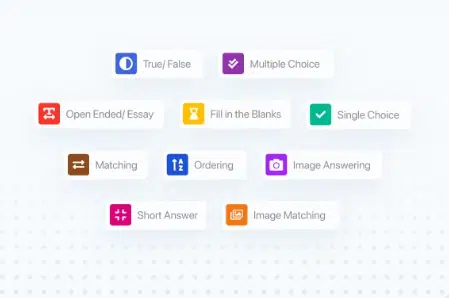
Tailor quizzes by configuring timers and passing grades, and provide instantaneous feedback and accurate answers to learners.
4. Certificate Generation and Incentives
It helps to elevate student motivation by automating the generation of certificates upon successful course completion. These certificates can be uniquely customized to reflect individual branding for a personalized touch.
5. Effective Monetization and Sales
You can seamlessly integrate with WooCommerce to facilitate course sales, allowing for flexible pricing options and discount coupons.
It accepts payments through a range of gateways to provide ease and convenience to both instructors and learners. You will get a separate dashboard for instructors that will help you to understand each instructor’s performance.
6. Intuitive Frontend Course Builder
Empower instructors with the ability to construct courses directly from the front end of their website.
This intuitive interface streamlines the course creation process, contributing to an enhanced user experience.
7. Dedicated Student and Instructor Dashboards
Provide distinct dashboards for students and instructors, fostering a seamless learning and teaching experience.
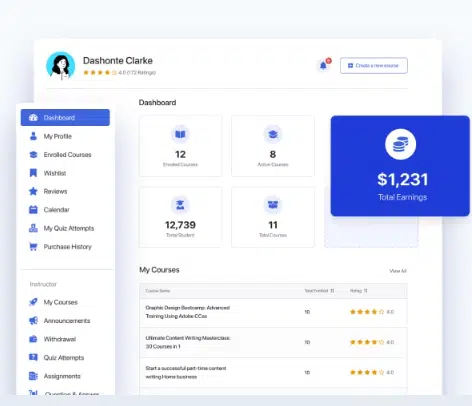
Students can easily monitor their progress and review completed courses, while instructors gain the tools to manage courses, access analytics, and engage with their students.
8. Communication and Engagement
Simplify communication through a built-in announcement system for vital updates.
Foster interactive learning environments with dedicated Q&A sections where students can pose queries and instructors can promptly respond. Furthermore, offer discussion forums to encourage course-related interactions.
9. Robust Analytics and Detailed Report
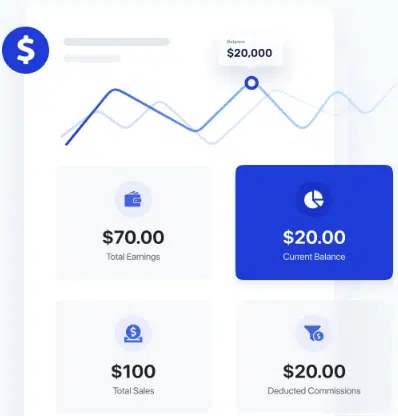
Monitor student progress and performance comprehensively, enabling effective tracking of course enrollment and completion rates for informed decision-making.
10. Seamless Integration and Compatibility
Tutor LMS seamlessly integrates with WordPress websites and is compatible with a variety of WordPress themes, ensuring smooth implementation and operation.
11. Optimized Responsive Design
Prioritize user experience with a mobile-friendly and responsive design, guaranteeing optimal course engagement across diverse devices.
12. Localization and Multilingual Support
Tailor the learning experience to a global audience by providing multilingual options and translating the plugin into different languages.
Read Also:
FAQS Related to Tutor LMS Pricing & Features
Here are some FAQs you should know about Tutor LMS-
1. Will you charge the price every year automatically?
The Tutor LMS does not come with an auto-renewal subscription. You have to buy a plan, again and again, to stay updated each year. So it’s good to grab the lifetime license.
2. Can I get a refund?
There is a 30-day refund policy. If the Tutor LMS is unable to solve the problem you are facing, they will refund your money within 7 business days.
3. Do I have to pay the full price if I upgrade?
If you upgrade within your first 60 days of purchase, you have to pay only the difference. You will get some discount within the paid period. But if you upgrade after the license is expired, you won’t get any discount.
4. Does Tutors LMS offer discounts for nonprofits?
The Tutor LMS offers a 30% discount for non-profit organizations. You have to contact the support team to check your eligibility.
5. How Much Does Tutors LMS Cost?
Tutor LMS will cost you $199 to $799 per year. The lifetime license will cost you $499 to $1899 one-time payment for the entire life.
Conclusion
Tutors LMS offers different pricing options for different kinda businesses and individuals.
If you are an educator or an organization seeking to establish a dynamic and effective online learning environment, the Tutors LMS pricing is so affordable and worth trying.
The Tutor LMS free plan is an amazing option as a starting point. It offers all the essential course creation features and management tools to kick-start the journey into online education.
You can upgrade to the Tutors LMS Pro plan as your business grows and you need more advanced features such as multimedia support, quiz customization and WooCommerne integration for course monetization.
If you have more specialized demands with a larger organization, the business plan can be a good suit for you you can avail of only $399 for the annual plan and $899 for the lifetime license.
So what are you trying for? Grab the Tutor LMS Lifetime Deal and stay hassle-free for life!
I hope you have loved this article about the Tutor LMS Pricing Plan. Please share with your friends via social media like Facebook, Twitter and LinkedIn.





Well says, I’m going to buy this tool, Using your refer link.
Thank you
I am glad you have loved this tool. And thanks for buying through this article!