HubSpot Marketing Hub Pricing 2024: 90% Discount Live Now
Are you looking for HubSpot Marketing Hub Pricing?
You are at the right place!
HubSpot Marketing Hub offers marketers a centralized platform to manage their marketing data.
You will get every element of marketing, including campaign reporting, custom reporting, social media, and omnichannel marketing automation to grow your business faster.
Now let’s dive deeper and learn more about the HubSpot Marketing Pricing plan and features with its pros and cons-
HubSpot Marketing Pricing In Brief
| Product Name | HubSpot Marketing Hub |
|---|---|
| Best Used For | Small To Large Scale Marketing Team |
| Pricing | Starts at $20 Per month |
| Yearly Discount | 10% Yearly Discount |
| Other Discount | 90% For Startups & 40% for Non-profit organizations |
Read Also: What is HubSpot? How Does it Work?
HubSpot Marketing Plan Explained
HubSpot Marketing Hub Pricing plan offers exclusive features both for inbound marketing and an enterprise-level company. It offers competitive pricing options to suit your needs and budget. Now let’s learn in more detail about HubSpot price and features-
1. HubSpot Marketing Hub Starter
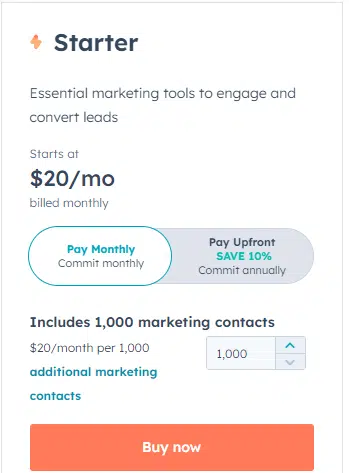
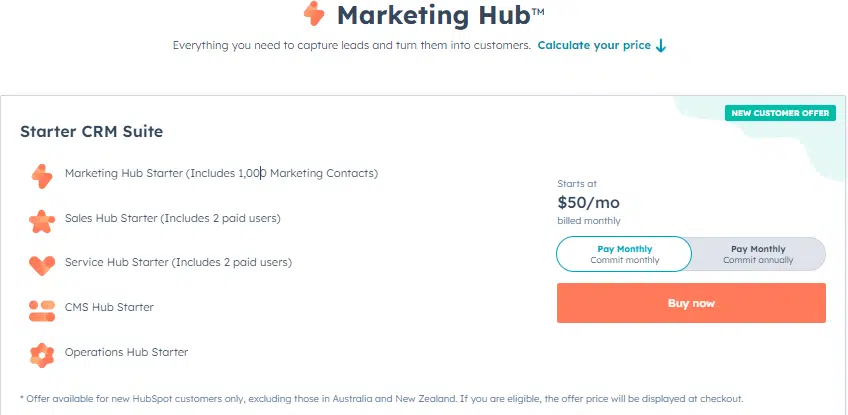
HubSpot’s Starter plan is an excellent option for small businesses seeking email marketing services and basic digital marketing support.
The starter plan starts at $20 per month. If you pay for the annual plan, you will get an exclusive 10% discount. That is the Hubspot marketing hub annual plan will cost you $18 per month.
You will get 1,000 marketing contacts and you have to pay an additional price per month per 1,000 additional marketing contacts.
The best thing you will love about the HubSpot marketing starter plans is its premium hosting, which includes an SSL certificate and custom domain security settings.
You can choose from website themes and use a drag-and-drop editor to develop your website locally.
HubSpot’s Starter plan also includes customizable native and pop-up forms and list segmentation. Standard marketing and productivity reports help businesses stay on top of their marketing efforts.
The plan also includes email marketing tool capabilities that will allow you to send customized emails to your clients.
Features in Brief:
- Email marketing tools for targeted campaigns
- Landing pages for effective lead generation
- Live chat feature for real-time customer engagement
- Forms for capturing valuable customer data
- Email and in-app chat support for seamless communication
- Payment integration (U.S. only) for secure transactions
This offer is exclusively available for new HubSpot customers, except those located in Australia and New Zealand.
2. HubSpot Marketing Hub Professional
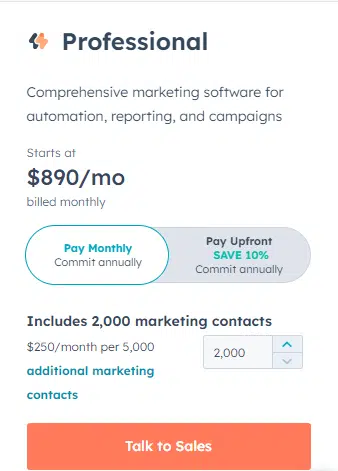
The Professional plan in HubSpot Marketing Hub will cost you $890 per month and you will get an exclusive 10% discount if you subscribe to the yearly plan. That means $1080 in savings in a year!
You will get 2,000 marketing contacts for $890 per month and $250 per month per 5,000 additional marketing emails. Of course, the annual discount is also available for the additional contacts.
With Hubspot Marketing hub Pricing plan you can access advanced reporting and analytics to get insights into their marketing efforts and make data-driven decisions. It also includes top-notch marketing automation tools that can help streamline tasks and save time.
The deep integration with HubSpot Sales Hub helps the sales teams with valuable information about leads and prospects.
Features in Brief:
- Starter Plus package
- Omni-channel marketing automation for comprehensive outreach
- Campaign reporting for tracking marketing performance
- Social media integration for broader audience reach
- Custom reporting for tailored analytics insights
- Teams feature for collaborative work management
Please note that the displayed cost does not include the necessary one-time Onboarding fee, which incurs a fee of $3,000.
3. HubSpot Marketing Hub Enterprise
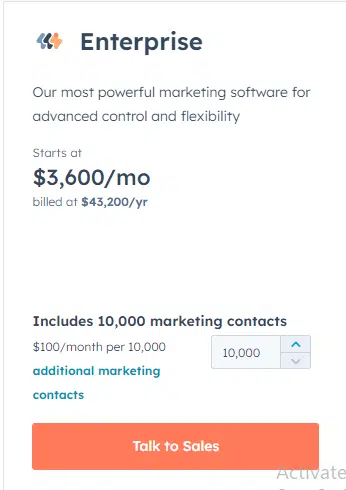
HubSpot’s Enterprise plan is ideal for large businesses looking for advanced marketing tools to streamline and improve their marketing efforts.
You will get 10,000 marketing contacts at $3600 per month and an additional cost of $100 per month per 10,000 additional marketing contacts.
If you are an organization that needs marketing automation experience, including predictive lead scoring and multi-touch revenue attribution, the HubSpot Enterprise plan is the best for you.
The predictive lead scoring feature of the Hubspot enterprise plan helps sales teams identify the highest quality leads and focus their time
Features in Brief:
- Professional Plus tier
- Multi-touch revenue attribution for accurate ROI analysis
- Access control for content and data security
- Team organization features for efficient collaboration
- Custom behavioural events tracking for in-depth user behaviour analysis
- Custom objects for flexible data management
Please be aware that the displayed cost does not encompass the mandatory, one-time Enterprise Onboarding, which incurs a fee of $6,000.
Why You Should Use HubSpot Marketing hub
If you need premium features like email marketing, and scope to create custom reports or automate your marketing efforts, HubSpot Marketing Hub of the Enterprise plan is a must-have.
Now let’s see why you should use HubSpot Marketing hub for your business growth-
1. All-in-One Marketing Solution
Marketing can be a complex and multifaceted operation. It’s become impossible to maintain email marketing, social media management, lead generation and analytics separately.
Because it can be time-consuming and inefficient and this is where an all-in-one marketing solution comes into play.
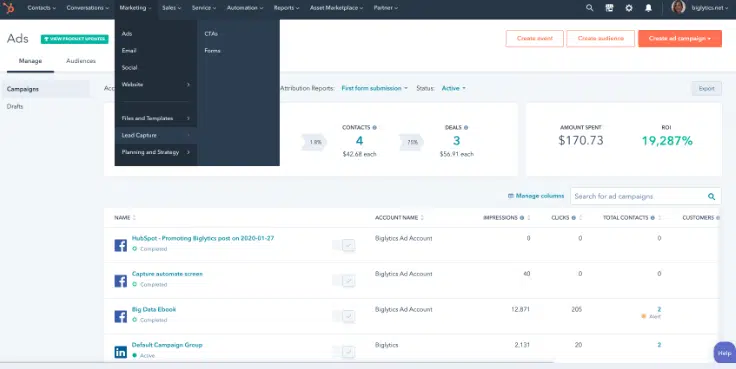
HubSpot Marketing Hubs is an all-in-one marketing solution that is a consolidated platform that offers all the marketing tools you need in one place.
You don’t have to switch between platforms or integrate different tools manually with this all-in-one solution. Everything is integrated for ease of use, so you can manage your marketing efforts seamlessly.
HubSpot Marketing Hub Plan also simplifies marketing efforts that will save time and reduces the likelihood of errors, improving the efficiency of your marketing team.
2. Easy-to-Use Interface
The interface of HubSpot Marketing Hub is designed to be user-friendly and intuitive, even for marketers who are not familiar with complex software.
The navigation is straightforward and features are organized logically, which greatly reduces the learning curve for new users.
The Starter Package is perfect for businesses that want to get started with digital marketing and automation without investing in all the in-depth automation features.
This package includes essential features such as email marketing, lead capture forms, a contact management system, lead flows, and ad management that can be used to build a solid foundation for marketing efforts.
HubSpot Marketing Hub also provides several integrations that can streamline workflows and enhance functionality. These integrations include tools for CRM, email tracking, team email, social media management, SEO, and video hosting.
3. Marketing Automation
Companies can create and execute effective email automation, social automation, ads automation, website automation, and chat automation workflows to drive traffic, generate leads, and enhance customer satisfaction With HubSpot Marketing Hub.
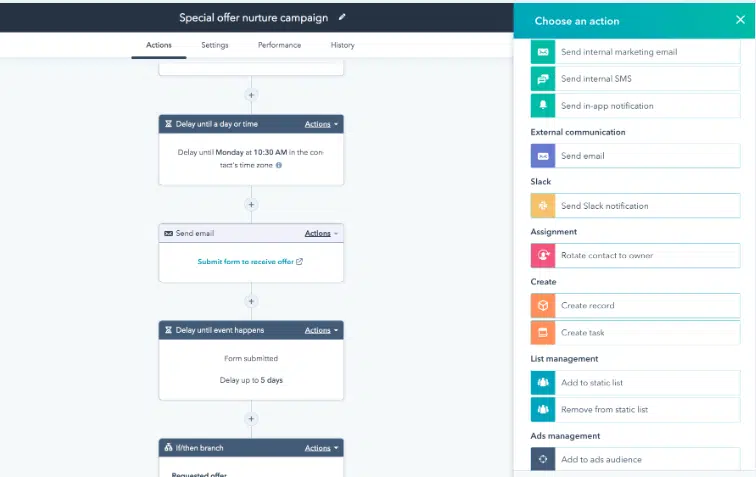
The marketing hub starter package comes with up to 5 workflows, with additional workflows available as businesses grow or upgrade. The professional plan offers 10 workflows, while the enterprise plan provides unlimited workflows.
4. Personalization and Segmentation
Personalization and segmentation are two essential concepts in HubSpot Marketing Hub.
These help you to deliver targeted messages to your customers that help in higher engagement and conversion rates.
You can create a more tailored experience for their audience, ultimately earning their trust and loyalty by personalizing messages to individual customers.
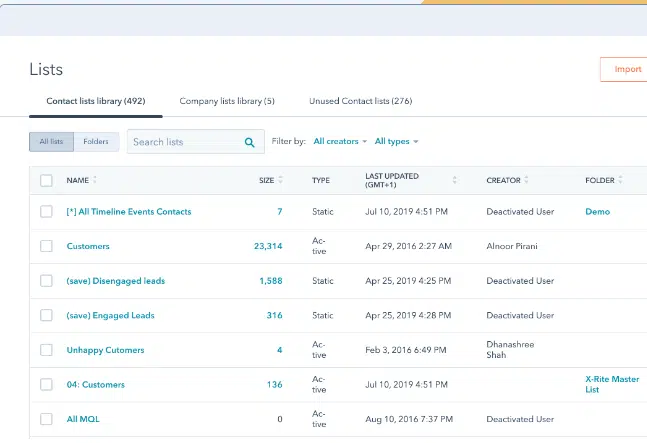
You can also identify the different characteristics of their target audience, such as demographics, behaviour, and interests.
This information can be used to create targeted email campaigns that are optimized for mobile devices.
This is particularly important, as more people are accessing their emails on mobile devices than ever before.
5. Lead Generation and Management
You can capture potential customers, convert them into leads through automated nurturing campaigns and lead scoring, and hand them over to the sales team for conversion with the HubSpot Marketing Hub.
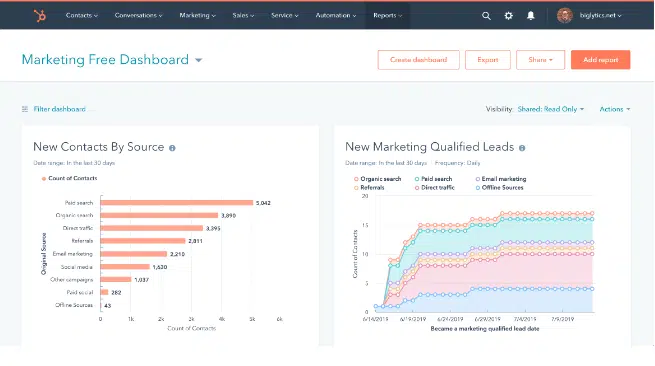
The automated nurturing campaigns enable you to personalize your communication with prospects and engage them over the long term.
They can also increase the chances of conversion. Lead scoring allows you to prioritize leads based on your level of readiness to buy, making it easier to identify and focus on high-quality leads.
It provides robust lead tracking and attribution tools, which help you to understand the effectiveness of your marketing efforts and your impact on revenue.
With the capability to create custom event triggers and multi-touch revenue attribution, you can track every touchpoint throughout the customer journey, from the first interaction to purchase.
6. Content Management and SEO
You can optimize their website content to drive traffic and conversions while keeping track of the site’s performance with keyword monitoring, website visit tracking, and page audits.
These tools provide insights into the effectiveness of SEO strategies to refine content and improve search engine rankings.
HubSpot Marketing Hub’s integration with Google Ads makes it easy to create, manage, and track campaigns within the platform.
7. Analytics and Reporting
HubSpot Marketing Hub offers a robust analytics and reporting system that sets it apart from competing tools.
The platform’s reporting functionalities offer marketers a high level of detail and customization.
Reporting dashboards provide an all-in-one-place breakdown of website statistical performance, contacts, personas, and marketing efforts.
This data is essential to experienced marketers in assessing website performance and visitor engagement.
HubSpot Marketing Hub integrates social media analytics tools such as LinkedIn analytics, Twitter analytics, and Facebook insights.
The platform offers a range of SEO optimization tools that factor into the analytics reports. The SEO optimization tools allow marketers to access keyword-specific data and monitor their website’s visibility.
The reporting system’s custom reports feature enables you to create reports using the metrics that matter to their marketing strategies.
8. Integration with CRM and Sales Hub
HubSpot Marketing Hub is a powerful marketing automation tool that integrates seamlessly with HubSpot CRM and Sales Hub.
HubSpot CRM Suite is the company’s biggest offering, comprising features from all three hubs, and it is charged at a discounted price compared to purchasing all three subscriptions individually.
When these tools are combined with HubSpot Marketing Hub’s lead generation and nurturing capabilities, you can create a powerful customer experience throughout the entire sales process.
Under any of the single Hub plans, prices rise with additional contacts and additional features such as more custom properties, hierarchical teams, and custom reporting.
9. Support and Resources
HubSpot Marketing Hub offers an array of support options and resources to help marketers maximize the platform’s potential.
You can access these resources through various means, including email, chat, phone, FAQs, forums, knowledge base, training, documentation, videos, webinars, and in-person support.
Read Also:
HubSpot Marketing Starter Vs Professional Vs Enterprise
| Features | Free Tools | Marketing Hub Starter | Marketing Hub Professional |
|---|---|---|---|
| Live Chat | Includes HubSpot branding | Remove HubSpot branding | Remove HubSpot branding |
| Email Health Reporting | Limited features | Limited features | Additional features |
| List Segmentation | 5 active lists, 1,000 static lists, additional limits | 25 active lists, 1,000 static lists, additional limits | 1,000 active lists, 1,000 static lists, random list samples |
| Form Automation | 2,000 emails sends per calendar month with HubSpot branding, Remove HubSpot branding | Up to 10 automated actions | 1 automated email perform |
| Email Marketing | 2,000 emails sent per calendar month with HubSpot branding, Remove HubSpot branding | 5X marketing contact tier email send limit per calendar month, connect and authenticate an email sending domain, Remove HubSpot branding | 10X marketing contact tier email send limit per calendar month, Remove HubSpot branding |
| Additional Features | Custom properties: 10 in total | Custom properties: 1,000 per object | Custom properties: 1,000 per object |
Pros & Cons of HubSpot Marketing Hub
Pros of HubSpot Marketing Hub:
- A comprehensive suite of marketing tools and features
- User-friendly interface and intuitive design
- Powerful inbound marketing capabilities
- Robust lead generation and management tools
- Effective email marketing automation
- Extensive analytics and reporting functionality
- Integration with HubSpot CRM for seamless alignment with sales
- Regular updates and improvements from HubSpot
Cons of HubSpot Marketing Hub:
- Pricing can be relatively high for smaller businesses
- The learning curve for new users, especially for advanced features
Read Also Other HubSpot Tools Pricing
- HubSpot Sales Pricing Plan Explained
- HubSpot Customer Service Hub Explained
- HubSpot Overall Pricing Plan Discussed
- HubSpot CMS Pricing Explained
- Does HubSpot offer Black Friday?
FAQs Related to HubSpot Marketing Pricing & Features
Here are some FAQs related to HubSpot Marketing Plans-
1. What is HubSpot marketing hub used for?
HubSpot Marketing Hub is a versatile platform for streamlining marketing activities. It helps businesses attract, engage, and convert customers through inbound marketing strategies.
2. Why is HubSpot marketing good?
HubSpot Marketing has become highly popular for its comprehensive tools, user-friendly interface, and data-driven analytics. It empowers marketers of all levels with effective inbound marketing, lead generation, and automation capabilities, leading to improved ROI and enhanced customer engagement.
3. Is HubSpot used for email marketing?
Yes, HubSpot is used for email marketing. Its Marketing Hub offers powerful tools for designing, sending, and tracking email campaigns. With features for personalization, segmentation, and automation, businesses can optimize their email marketing efforts for better engagement and results.
4. Is HubSpot good for SEO?
Its Marketing Hub offers valuable tools and features for optimizing websites and improving search engine rankings. With on-page SEO recommendations, keyword research, and performance monitoring, businesses can enhance their online visibility and attract organic traffic effectively.
Conclusion
If you are considering HubSpot Marketing Hub pricing, it is important to conduct comprehensive research to make an informed decision.
HubSpot offers various plans suitable for different marketing needs. Experienced marketers may find the advanced features of the enterprise plans beneficial, while smaller teams can opt for the starter or professional plans.
The HubSpot Marketing Hub provides personalized bundles tailored to specific marketing requirements, offering a cost-effective option.
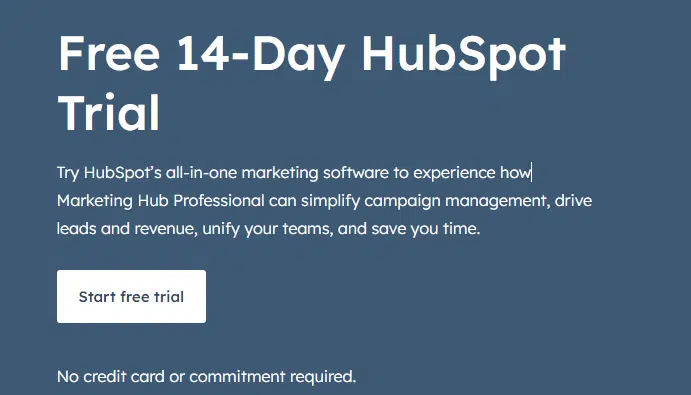
You can take advantage of the free trial allows businesses to test the software and ensure it aligns with their marketing goals.
Investing in onboarding and training is crucial for maximizing the potential of HubSpot Marketing Hub.
By effectively onboarding team members and providing adequate training, businesses can seamlessly adopt the platform and fully leverage its marketing automation tools.
By carefully selecting bundles and implementing effective onboarding strategies, businesses can enhance their marketing efforts, improve customer relationships, and gain a competitive edge with HubSpot Marketing Hub.
I hope you have loved this article About HubSpot Marketing Hub. Please feel free to share with your friends on social media like LinkedIn, Facebook and Twitter.