
Top 7 Fastest WordPress Hosting Compared (2024)→FacileWay
Are you looking for the fastest WordPress Hosting?
The straight answer is Kinsta.
Blogging is mostly a one-person game. Managing a blog is quite a heavy task. Many people think blogging is only writing content and publishing the content on the blog.
But actually, blogging has some other serious tasks to do. Such as-
- Optimizing Your blogging platform like my platform is WordPress
- Protecting site from the hackers
- Blog Promotion
- Updating content
- Changing designs
- Social media marketing and many more!
Besides so many things like this, there is another important thing we bloggers face every day. These are WordPress issues caused by different plugins or coding mistakes.
So, if you can choose a managed WordPress hosting, that is taking care of all of your WordPress-related issues, it becomes easier to do the best work.
Kinsta will make it easy for you! It will take care of your every website’s issue and you can take care of your business smoothly.
What you will get with Kinsta?
- Free CDN for a high-speed web surfing experience
- Server-level caching with Nginx Fast/CSG cache feature
- Custom dashboard
- Automated backups [Daily]
- Free SSL certificate
- Free site migration
- Easy SSH access
- Site staging
- Blazing fast customer support with WordPress experts
Performance:
- Average response time: 84(ms)
- Uptime: 99.99%
Read also: Kinsta Black Friday Deals [2 Months Free Usages] & Kinsta Review
- Kinsta Alternatives: Fastest WordPress Hosting Companies
- Why Speed is Important?
- What are Your Hosting Needs?
- How To Choose The Fastest WordPress Hosting Provider
- How to Perform a Comprehensive Performance Analysis of Your Website
- What Makes Kinsta The Fastest Hosting Ever?
- Frequently Asked Questions
- 1. Can fast hosting really make that much of a difference?
- 2. How do WordPress hosting providers achieve faster loading times?
- 3. What kind of support can I expect from WordPress hosting?
- 4. Will fast WordPress hosting be more expensive?
- 5. Can I migrate my website to fast hosting if I’m not tech-savvy?
- 6. How does fast hosting improve website security?
- 7. Can I upgrade or downgrade my plan with fast hosting?
- 8. Are there any disadvantages to using fast hosting?
- 9. How do I know if a WordPress hosting provider is right for my website?
- 10. What kind of uptime guarantee can I expect from WordPress hosting?
- Conclusions: Fastest WordPress Hosting Providers
Kinsta Alternatives: Fastest WordPress Hosting Companies
Why you should be stuck with one Hosting provider when there are other WordPress hosts that are offering the fastest web surfing?
Kinsta is not for everyone. If you are a beginner with a low budget, then the normal shared hosting plan is the perfect solution for you.
Because it can be expensive for a beginner to cost $30/month. Don’t worry you can upgrade any time once you have started an amount of money that can bear the expense of $30/month.
Read more about Kinsta Pricing Plans.
So now let’s see some other fastest WordPress hosting companies that are offering a great web hosting solution-
Fastest WordPress Hosting Providers at a glance:
| Hosts | Price | Site | Visit |
| Kinsta | $30/Month | 1 | Visit |
| FlyWheel | $15/Month | 1 | Visit |
| DreamHost | $16.95/Month | 1 | Visit |
| InMotion | $4.99/Month | 1 | Visit |
| WPX Hosting | $20.83/Month | 5 | Visit |
| CloudWays | $10/Month | 1 | Visit |
1. FlyWheel
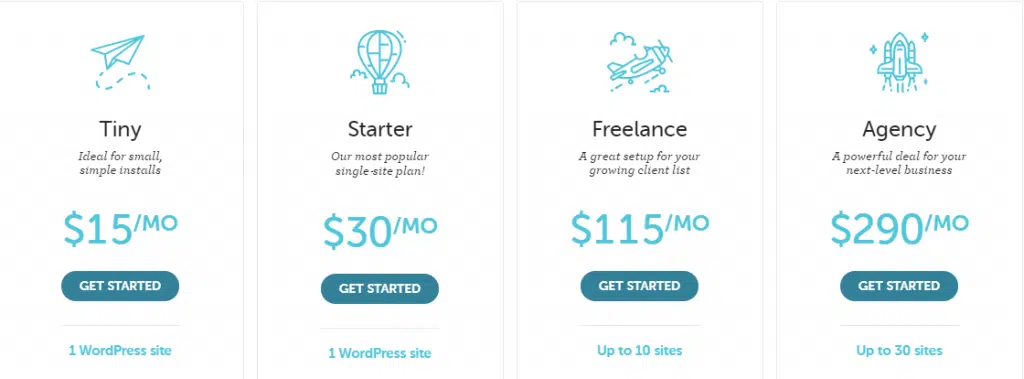
FlyWheel is another fastest WordPress hosting that offers pricing packages that are suitable for everyone from freelancers to agencies. This WordPress hosting is a good alternative to Kinsta.
It’s powered by Google and offers a free content delivery network and custom dashboards like Kinsta. Flywheel has several data centres in different locations all over the world which made it enough fast WordPress hosting provider in the world.
Pricing and plan details
Flywheel starts only at $15 per month. This hosting plan allows only 5000 visits per month to a single website.
If there is any traffic spike, you can upgrade to $30 per month with the starter plan that allows 25000 monthly visits with 10GB disk space.
You will get two months free with the annual subscription. Flywheel also has two plans for Freelance and agency. That respectively starts at $115/month and $290/month.
Performance
- Uptime 99.99%
- The average response time is 1.2 seconds
FlyWheel Features
- Free CDN
- Free StudioPress Themes
- Auto healing
- Site staging
- Site cloning
- Free auto backups
- Free site migration
2. DreamHost
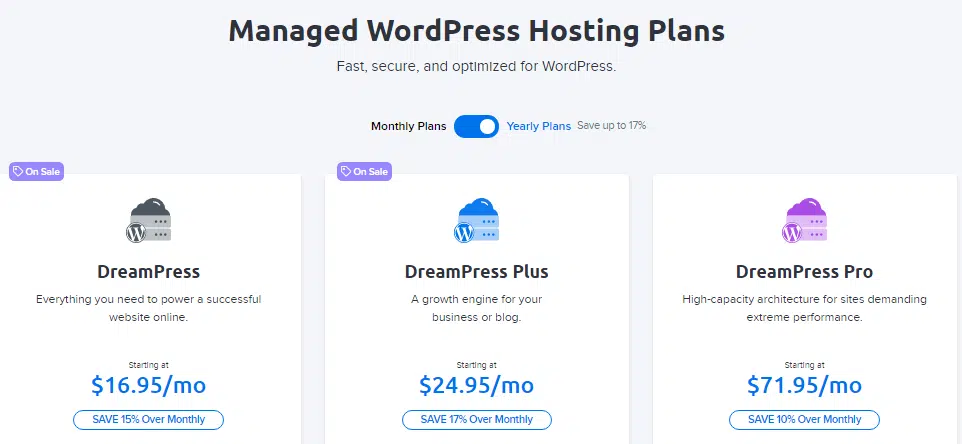
DreamHost is also one of the fastest WordPress hosting companies that offer budget-friendly shared and managed WordPress hosting services. You will get free installed WordPress. The JetPack Premium is also free with DreamHost-managed WordPress hosting.
Pricing and plan details
The basic DreamHost plan managed WP host plan starts at $16.95 per month. This hosting plan allows 10,000 monthly visits with 5 GB of disk space. There are other two plans Plus and Pro plan that respectively $24.95 per month and 71.85 per month.
DreamHost’s shared hosting plan is very affordable and beginner-friendly. But you will miss out on many features of WordPress-optimized DreamPress Plans.
This hosting company comes with a 97-day money-back guarantee. So there is nothing to lose if you are disappointed!
Performance
- 99.99% uptime
- The average response time is 1.06 seconds
Dreamhost Features
- 100k Monthly Visitors
- Unlimited Email
- 30GB SSD Storage
- Unmetered Bandwidth
- 1-Click Staging
- SSL Certificate Pre-Installed
- On-Demand + Daily Backups
- Jetpack Free Pre-Installed
- NEW Free Automated WordPress Migrations
- WP Website Builder
3. InMotion Hosting
You will get any kinda hosting like shared VPS, and dedicated and managed WordPress hosting on InMotion Hosting. Its WordPress-optimized Stack and Free CDN deliver exceptional loading times.
InMotion is one of the most affordable fastest WordPress hosting solutions out there. You will get pre-installed WordPress, a drag & drop website builder, and automatic WordPress themes and plugin updates with InMotion Hosting Plan.
Pricing and plan details
InMotion WordPress hosting starts at $4.99/month. This plan includes a single website with 50 GB of disk space and 20,000 monthly traffic.
There are also two other plans for small businesses and developers that respectively cost $7.99 per month and $10.99 per month. You will get the highest money-back guarantee period of 90 days with each plan.
You will also get Premium WordPress plugins like JetPack, Speed Coach, Total Upkeep, and many more with their WordPress free site migration.
Performance tests
- 99.99% Uptime
- The maximum response time: is 0.84 seconds
Inmotion Features
- SSD Storage
- High Performance
- Free Domain & SSL Certificate
- Unlimited Bandwidth
- Unlimited Email
- Advanced Caching plugin
- Jetpack Personal
Read also: Inmotion Black Friday Sale-Get HUGE Discount!
4. WPX Hosting
WPX hosting is the best hosting for the WordPress site owner who wanna host multiple websites on a single plan.
This is one of the best-managed WordPress hostings and is considered one of the top fastest WordPress hosting companies.
This hosting offers multiple websites hosting on their starter plan at a cheaper rate than Kinsta and FlyWheel.
Pricing and plan details
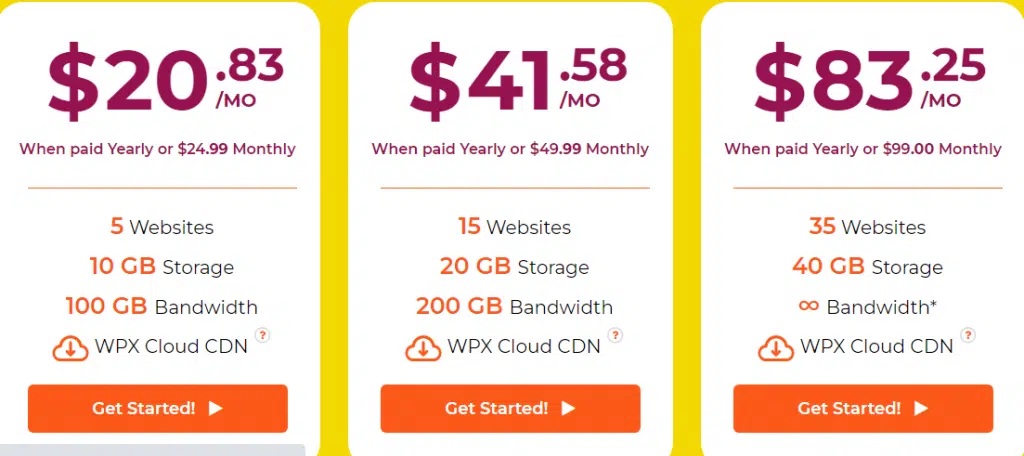
WPX Hosting starter plan starts at $20.83 per month where you can host up to 5 WordPress sites with unlimited SSL certificates, 10GB storage, site staging, high-speed custom CDN for improved site speed and many more!
There is two other hosting plan Professional and Elit which costs $41.58 and $83.25 per month respectively.
You will get free site optimization, unlimited site transfer, daily malware detection, and removal, and free site fixes if your site is down with this hosting that made this hosting the fastest web hosting company.
Performance
- 99.95% uptime
- The average response time is 1.36 seconds
WPX Hosting Features
- High-speed custom Content Delivery Network
- Unlimited site migration
- Unlimited SSL certificates
- Manual backups
- Malware protection
- PHP 7. X
- 30 Days money-back guarantees
- Free WordPress installation
Read also: WPX Black Friday Deals
5. CloudWays Hosting
CloudWays is another leading and fastest WordPress hosting company. Its managed hosting services allow you to choose your VPS provider from the best options like DigitalOcean, Vultr, Linode, AWS, and Google Cloud.
You will get an optimized stack and a built-in CDN, site staging, free SSL certificate, free WordPress installations, and automatic backup with each option.
Hosting with CloudWays is not as easy as other managed hosting platforms. If you are launching your website for the first time, this hosting is not recommended as you have to have a little experience to host your site on CloudWays.
Pricing and plan details
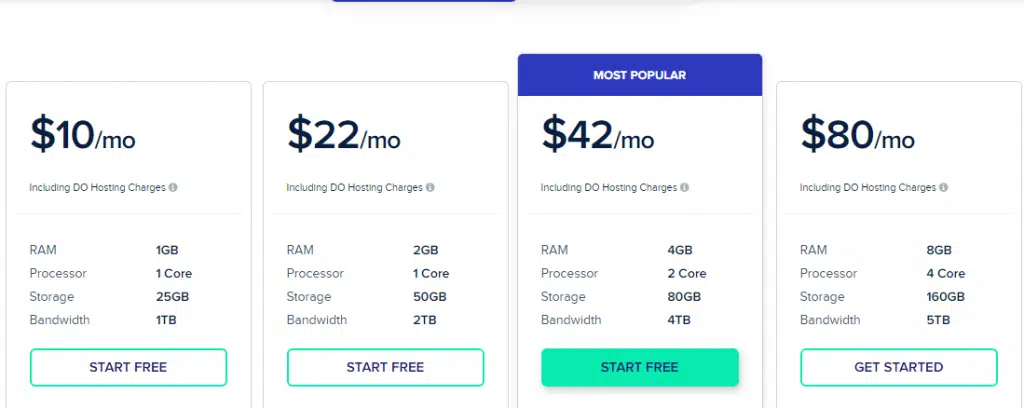
CloudWays offers a free trial to have a test drive of their hosting. If you are satisfied with their service, you can launch their WordPress site starting from $10 per month.
There are huge freebies CloudWays offers to their customer. You will get free SSL, free CDN, auto-healing, and many more with their hosting plan.
If you are obsessed with the website speed, you can play around with this amazing hosting.
Performance
- 99.99% uptime
- Average response time: 0.89 seconds
Cloudways Features
- 5 Cloud Providers
- Unlimited Applications
- All PHP Apps Supported
- Innovative Control Panel
- 24/7/365 Support
- Managed Security
- Automated Backups
- 24/7 Real-time Monitoring
- Optimized Stack
- Built-in CDN
- Auto-Healing Servers
- PHP 7.3 Ready Servers
Read also: CloudWays Black Friday Deals [40% Discount Coupon]
7. WP Engine
WP Engine is a managed WordPress hosting platform that is known for its advanced features and superior performance capabilities.
What makes WP Engine stand out from other hosting providers is the range of unique features it offers, such as industry-leading performance powered by the Google Cloud Platform, a user-friendly dashboard, advanced security measures, and staging environments for testing changes to your WordPress site.
WP Engine’s hosting infrastructure is designed to deliver exceptional speed, reliability, and security.
With the use of Google Cloud, WP Engine provides lightning-fast website loading times and exceptional uptime.
The platform’s proprietary caching system, EverCache, ensures that your WordPress site loads quickly and efficiently.
The user-friendly dashboard is another standout feature of WP Engine, allowing users to easily manage their WordPress websites, including updates, backups, and security.
The intuitive interface makes it easy for users to navigate and make changes to their websites without requiring extensive technical knowledge.
WP Engine takes security seriously, providing a range of advanced security measures such as malware scanning, firewall protection, and daily security audits. These features ensure that your WordPress site is protected from cyber threats and data breaches.
Pricing and Plans Detail
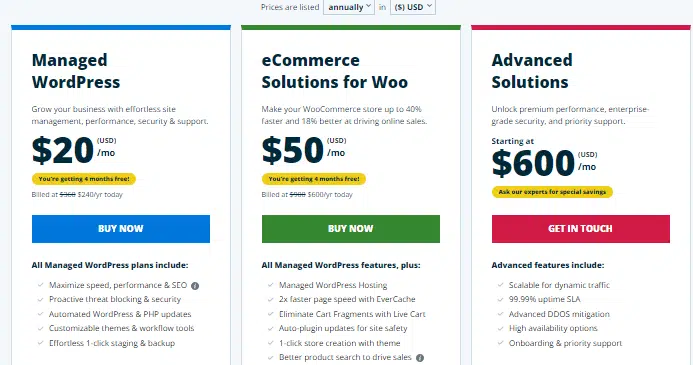
WP Engine’s pricing plans are based on the number of monthly website visits and start at $30 per month for up to 25,000 monthly visits.
The plans go up to $290 per month for up to 400,000 monthly visits, with custom enterprise plans available for larger websites with high traffic volumes.
All of WP Engine’s plans include a range of advanced features, including access to the Google Cloud Storage, EverCache, daily backups, and a content delivery network (CDN) for lightning-fast website loading times.
Additionally, users have access to a range of security measures, such as malware scanning and firewall protection, to ensure their websites are protected from cyber threats and data breaches.
While WP Engine’s pricing plans may be higher than some other hosting providers, the platform’s advanced features and performance capabilities make it a worthwhile investment for businesses and individuals who require a reliable, high-performance hosting solution.
With its user-friendly interface and advanced security measures, WP Engine allows users to focus on creating great content and growing their online presence without worrying about technical website management issues.
WP Engine Features
- Industry-leading performance powered by Google Cloud
- User-friendly dashboard for easy website management
- Advanced security measures, including malware scanning and daily security audits
- Staging environments for testing changes to your website
- EverCache proprietary caching system for lightning-fast website loading times
- Content Delivery Network (CDN) for improved website performance
- 24/7 customer support and access to developer tools
- Automatic daily backups and one-click restore
- Support for multiple websites and the ability to use third-party plugins and themes
- Git integration and version control for developers.
Read Also: WP Engine Black Friday Deal
Why Speed is Important?
The fastest WordPress hosting will help you to rank on the first page. This is one of the best On-Page SEO optimization methods.
Slow web hosting will slow down your website. It can also slow down your admin dashboard also will make you work harder and which is very time-consuming.
The fastest WordPress hosting will make your visitor feel comfortable while surfing on your site. A slow website that loads slower makes them go away.
Like if anyone trying to comment on your blog post or share your content and face slow web surfing, he may skip the process and leave your site immediately.
According to a study made by Akamai, 47% of website visitors expect that the page will be loaded within two seconds or less.
40% of the website visitors leave the website immediately if the page takes more than three seconds to load. That means just one second in slow loading can reduce 7% of conversions.
Now how you can imagine, how important it is to make sure your site is loading fast, and this is only possible when you are having the fastest WordPress hosting.
Read also: Best Web Hosting For WordPress Bloggers [Recommended By Experts]
What are Your Hosting Needs?
Before choosing a hosting for your WordPress website, you need to answer the following questions-
- Do you have a static website?
- Is your website dynamic?
- Is your site growing big?
- What kinda content is published on your website?
- Where is your target audience location?
Now answer the questions one by one-
A static website means a small blog or business website where the content doesn’t change frequently. You can try shared hosting for this kinda website.
A dynamic website means an eCommerce store, online communities, forums, and others that need additional hosting support and caching requirement. In that case, you will the fastest WordPress hosting.
If your site contains heavy content like video animations, images, and audio files and your audience is growing fast, you will need to host your site on a Cloud hosting platform or managed WordPress hosting provider.
You need to keep into consideration your target audience location, to have a fast web hosting experience.
How To Choose The Fastest WordPress Hosting Provider
If you are looking for the fastest WordPress hosting provider, follow the step I have mentioned here-
Step one: Select one of the above hosting providers
After selecting one of the mentioned hosting providers, take note of what they offer, and which hosting offers the best deal for you at your budget amount.
Step two: Check their server location
Some web hosting provider directly shows their dedicated server location while you are signing up with your hosting plan.
If it does not show on that page, directly contact the hosting support team. Try to choose a server location close to your audience location. The closer location you can choose, the better speed you can serve.
Final step: Choose your plan
Once you have decided on your hosting provider that serves best of all your needs, you have to choose your plan that fits your budget, audience, and your goals. That’s all!
If you follow the steps I have mentioned above, it will be easy to find out the best suit for your fastest WordPress hosting.
How to Perform a Comprehensive Performance Analysis of Your Website
As a website owner, you want to make sure that your website performs well and provides an excellent user experience.
It’s not always easy to know where to start when it comes to analyzing your website’s performance.
1. Website Load Time
Website load time is one of the most important factors to consider when analyzing your website’s performance.
A slow-loading website can lead to high bounce rates, as users tend to lose patience and leave the website.
To measure your website’s load time, you can use tools like Google PageSpeed Insights or GTmetrix.
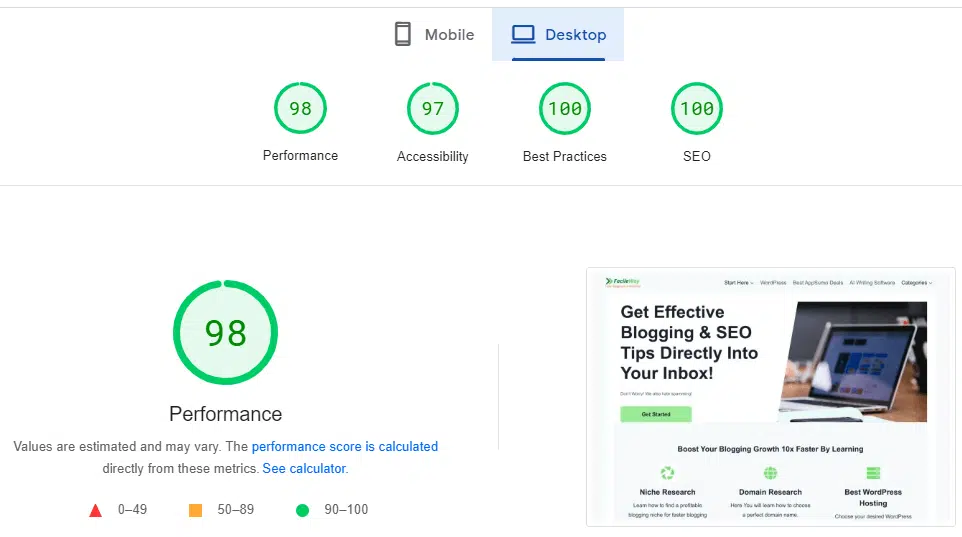
If your website’s load time is slow, you can consider optimizing your website’s images, compressing files, and minimizing HTTP requests.
You can also consider using a content delivery network (CDN) to distribute your website’s content to servers around the world, reducing the distance between your website and your users.
2. Page Speed
Page speed is another critical factor that affects your website’s performance. A website with a fast page speed can help to improve user experience and boost your website’s ranking in search engine results pages (SERPs).
You can use tools like Google PageSpeed Insights or Pingdom to analyze your website’s page speed.
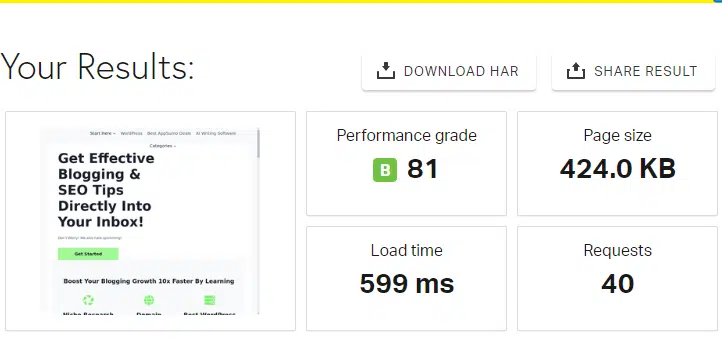
If your website’s page speed is slow, you can consider optimizing your website’s code, compressing files, and minimizing HTTP requests.
You can also consider using a caching plugin to cache your website’s content and improve its load time.
3. Responsiveness
With more and more users accessing websites on mobile devices, it’s essential to ensure that your website is responsive and adapts to different devices, screen sizes, and orientations.

You can use tools like Responsinator to test your website’s responsiveness on different devices.

If your website is not responsive, you can consider using a responsive design or a mobile-specific website to provide a better user experience for mobile users.
4. Navigation
The navigation of your website is crucial to ensure that users can find the content they’re looking for quickly and easily.
You can test your website’s navigation by clicking on all the links and buttons to make sure they’re working correctly.
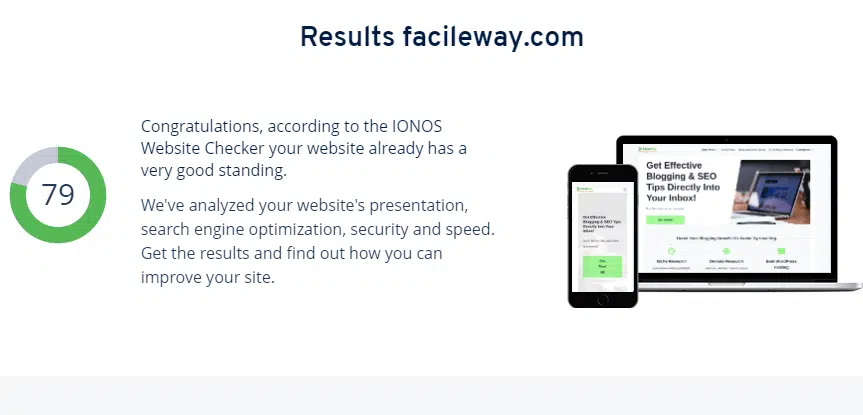
If your website’s navigation is not user-friendly, you can consider simplifying your website’s menus and organizing your content into categories to make it easier for users to find what they’re looking for.
5. User Experience
The user experience of your website is a critical factor that can affect how users interact with your website.
A website with an excellent user experience can help to improve engagement and conversion rates.
You can test your website’s user experience by conducting user testing or using tools like Hotjar or Crazy Egg.
If your website’s user experience is not optimal, you can consider improving your website’s design, content, and user interface to make it more user-friendly and engaging.
6. Security
Website security is essential to protect your users’ data and prevent cyber attacks. You can test your website’s security by using tools like Sucuri or Qualys SSL Labs to check your website’s SSL encryption and vulnerabilities.
If your website’s security is not optimal, you can consider installing an SSL certificate, using strong passwords, and updating your website’s software and plugins regularly.
7. Mobile Optimization
As mentioned earlier, mobile optimization is critical to ensure that your website performs well on mobile devices.
You can use tools like Google’s Mobile-Friendly Test to check if your website is mobile-friendly.
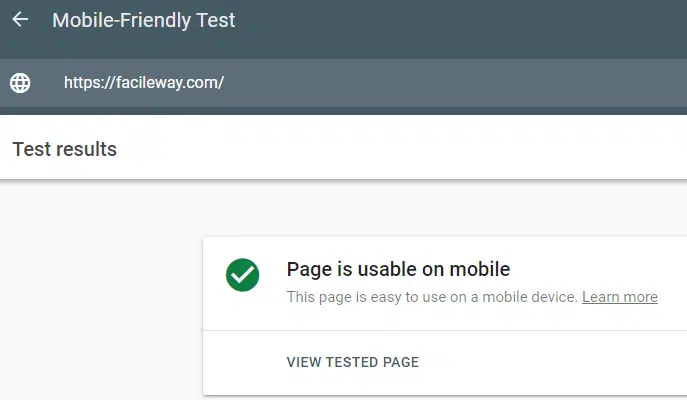
If your website is not mobile-friendly, you can consider using a responsive design, optimizing your website’s images and content for mobile devices, and simplifying your website’s
What Makes Kinsta The Fastest Hosting Ever?
These are some unique features that made this hosting the best-
1. Powered by Google Cloud Platform
Kinsta has taken hosting to the next level by utilizing the unparalleled power of GCP to host your website.
GCP’s lightning-fast performance and scalability make it the perfect choice for websites that demand high traffic and performance.
And with Kinsta’s expert optimization for WordPress, you can rest easy knowing that your website is in good hands.
2. Premium Tier Network
Kinsta’s servers are connected to a premium-tier network, which guarantees faster, more reliable, and more secure network connections.
This network infrastructure is Google’s most extensive, with lower latency and higher throughput than their standard network.
What does this mean for you? Faster page load times and better website performance, even during peak traffic hours.
3. Server-Level Caching
Kinsta has taken caching to the next level by implementing server-level caching, which stores frequently accessed data in the server’s memory.
This means that your website’s data can be quickly retrieved without querying the database, resulting in faster page load times and improved website performance.
Plus, with Kinsta’s expert optimization, you can rest easy knowing that your website’s caching is in good hands.
4. PHP 8.0 Support
Kinsta is always at the forefront of the latest technology, which is why they offer support for PHP 8.0, the latest version of PHP. PHP 8.0 has several performance improvements over previous versions, such as improved JIT (Just In Time) compilation and reduced memory usage.
By supporting PHP 8.0, Kinsta ensures that your website can take advantage of these performance improvements, resulting in faster load times and better website performance.
5. Built-in CDN
Kinsta knows that speed is essential when it comes to website performance, which is why they offer a built-in CDN powered by KeyCDN.
A CDN distributes your website’s content to servers around the world, reducing the distance between your website and your users.
This approach speeds up your website’s load times, especially for users who are located far away from your website’s server.
6. Automated Server-Level Optimization
Kinsta takes the hassle out of server optimization by providing automated server-level optimization, including caching, database optimization, and resource allocation.
This optimization ensures that your website is always running at peak performance, without the need for manual optimization.
Frequently Asked Questions
Here are some FAQs you should know about the fastest WordPress hosting providers-
1. Can hosting really make that much of a difference?
Absolutely! A fast hosting provider can make a significant difference in the speed and performance of your website.
Fast loading times not only improve user experience but can also help with search engine optimization (SEO) and lead to higher conversion rates.
2. How do WordPress hosting providers achieve faster loading times?
WordPress hosting providers use a variety of technologies and optimization techniques to achieve faster loading times.
This can include features like SSD storage, advanced caching technologies, content delivery networks (CDNs), and optimized web servers.
3. What kind of support can I expect from WordPress hosting?
WordPress hosting providers typically offer comprehensive support to help you with any issues or questions you may have.
This can include 24/7 customer support, live chat, phone support, and email support.
Some providers may also offer additional support features like knowledge base articles, tutorials, and forums.
4. Will fast WordPress hosting be more expensive?
While some fast WordPress hosting providers may be more expensive than others, the cost will ultimately depend on the specific provider and plan you choose.
It’s important to keep in mind that investing in fast WordPress hosting can ultimately save you money in the long run by improving website performance and reducing downtime.
5. Can I migrate my website to hosting if I’m not tech-savvy?
Yes, you can still migrate your website to hosting even if you’re not tech-savvy.
Most hosting providers offer migration services to help you transfer your website from one host to another.
You can also look for providers that offer easy-to-use control panels and user-friendly interfaces to make managing your website easier.
6. How does hosting improve website security?
Hosting can improve website security by implementing measures like firewalls, SSL certificates, and malware scans.
They may also offer advanced security features like automatic backups, two-factor authentication, and security monitoring to help protect your website from threats.
7. Can I upgrade or downgrade my plan with hosting?
Yes, most hosting providers allow you to upgrade or downgrade your plan as your website’s needs change.
This can help you save money and ensure that your website has the resources it needs to perform at its best.
8. Are there any disadvantages to using fast hosting?
While there are many advantages to using fast hosting, there may also be some downsides to consider.
For example, some fast hosting providers may be more expensive than other options.
Some providers may offer fewer features or customization options than others. It’s important to research your options carefully to determine the best fit for your needs.
9. How do I know if a WordPress hosting provider is right for my website?
To determine if a WordPress hosting provider is right for your website, consider your website’s needs and goals.
If you have a high-traffic website or require fast loading times for your users, a premium hosting provider may be a good fit.
If you have a small website with low traffic, a basic hosting plan may be sufficient.
10. What kind of uptime guarantee can I expect from WordPress Web hosting?
Most hosting providers offer an uptime guarantee, which means that they guarantee a certain amount of time that your website will be up and running.
The industry standard for uptime guarantees is typically around 99.9%, which means that your website should be up and running for at least 99.9% of the time.
Conclusions: Fastest WordPress Web Hosting Providers
There are tons of web hosting companies that can fulfil anyone’s needs and budget. But selecting the fastest WordPress hosting provider can be difficult for you.
It’s very crucial to know your business and your goals before selecting your web hosting.
Every web hosting provider has a good plan for the beginner. If you have just got started, the shared hosting plan is enough for you.
In that case, you can go with DreamHost shared plan is perfect. But if you are looking for the fastest one with a heavy website then Go for Kinsta. I have mentioned here some other that is close to Kinsta service.
Simply follow the steps I have mentioned about how to select the fastest WordPress web hosting and grab your hosting deal.
Did I miss anything?
Please let me know via the comment box and spread the content on your social media if you loved this piece.
Please let your friends know about these fastest WordPress hosting providers.

![9 Best Web Hosting Spring Sale Offer 2024 [Save Up to 98%]](https://facileway.com/wp-content/uploads/2021/05/best-web-hosting-spring-sale-offer-6-768x432.png.webp)


![What Is The Best Minecraft Server Hosting Provider? [2024]](https://facileway.com/wp-content/uploads/2022/11/What-is-the-best-Minecraft-Server-hosting-768x432.png.webp)

Thanks for the information. These companies are really good.
Thanks for stopping by.
Thanks, Sayem bro for sharing an amazing list of web hosting providers. My previous hosting plan is going to end soon and after reading this article I have got all the ideas of hosting that will be beneficial for me and my blog. You have covered all the points in detail which makes this article more interesting and valuable.
Regards
Suryakant
Thanks for stopping by and finding this article valuable.